
Receive Payment
The Receive Payment facility allows you to individually receive payment for Invoice Items billed to an Institution, that have not been included in a Batch.
Click on the Receive Payment button at the top of the Institution Menu.

Enter the Institution you wish to process a payment for. The system will default to the Branch you are logged in as and insert a From & To date based on the oldest and latest Invoice outstanding for that Institution & Branch.

Click OK to view all Invoice Items outstanding for that Institution & Branch.

To process a payment for an invoice item, tick the 'Include?' checkbox on the right side of the screen. This will pay off the outstanding balance for that item.
If you wish to write off an item billed to an institution—meaning the item will not be paid and the balance should be cleared—tick the 'Write-off?' checkbox instead. Written-off items will be displayed in red.
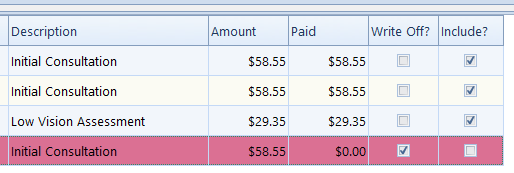
Once you have finished ticking the appropriate boxes, click OK to save your payment.